
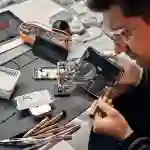


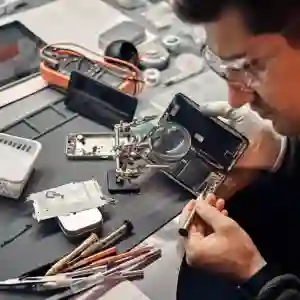
You’re texting, multitasking, or taking a quick photo and suddenly, your iPhone slips. One second later, you’re staring at a spiderweb of cracks running across your screen.
It happens to the best of us.
The real question is: what should you do next?
Panic won’t fix your screen but making smart, timely decisions can save you money, protect your data, and prevent further damage.
Here’s a step-by-step breakdown of what to do the moment your iPhone screen cracks and how to get it professionally repaired the right way.
1. Assess the Extent of the Damage
Not every crack is a disaster. Before you rush into repair mode, take a close look at the display. There are generally three levels of iPhone screen damage:
-
Minor Surface Crack: Cosmetic issue, touch functions work fine, screen visible and intact.
-
Moderate Damage: Cracks interfering with display clarity, slight touch delay, or discoloration.
-
Severe Damage: Screen unresponsive, flickering, lines appearing, or blacked-out display.
If your phone still works take advantage of that while you can. Back up your data immediately (we’ll get to that next).
2. Back Up Your Data Right Away
A cracked iPhone screen can quickly escalate into something worse total screen failure. If that happens, you risk losing your data.
Here’s how to back it up fast:
Option 1: iCloud Backup
-
Go to Settings → [Your Name] → iCloud → iCloud Backup → Back Up Now
This stores your photos, messages, contacts, and app data securely in the cloud.
Option 2: iTunes/Finder Backup (for Mac/PC)
-
Connect your iPhone to your computer.
-
Open Finder (Mac) or iTunes (Windows).
-
Select Back Up Now.
Backing up ensures you’re protected, no matter what happens next.
3. Avoid DIY Repairs — Seriously
You’ve probably seen dozens of YouTube tutorials claiming to fix iPhone screens at home. Don’t fall for it.
iPhone displays aren’t just glass they’re a fusion of glass, OLED/LCD, and delicate sensors (True Tone, Face ID, ambient light, etc.).
A wrong move can:
-
Break the Face ID module.
-
Damage the motherboard connector.
-
Ruin the waterproof sealing.
-
Void any remaining warranty or service coverage.
Unless you’re equipped with precision tools, adhesive sealants, and steady hands, you’ll end up turning a cracked screen into a dead phone.
4. Protect Yourself From Glass Shards
Cracked screens can splinter and those shards are sharp. If you need to keep using your iPhone temporarily:
-
Put on a tempered glass screen protector. It holds loose glass pieces in place.
-
Use a silicone case to prevent further cracking.
-
Avoid pressing too hard on the damaged area.
This will buy you time until you can get professional repair service but it’s a short-term solution.
5. Check Your Warranty or AppleCare+ Coverage
Before you spend money, check your options.
Apple’s warranty doesn’t cover accidental damage, but AppleCare+ does at a reduced repair cost.
Go to Settings → General → About → Coverage, or check your serial number on Apple’s website.
If you’re out of warranty or AppleCare+, professional third-party repair centers in Dubai often offer the same quality repair at a fraction of the cost with shorter turnaround time.
6. Understand What a Screen Replacement Really Involves
Many users assume that a “screen repair” means fixing the glass. In reality, iPhone screens are fused units. The replacement process involves:
-
Removing the damaged display.
-
Transferring sensors and Face ID modules.
-
Installing a new screen assembly.
-
Calibrating brightness, touch, and True Tone functionality.
Professional repair technicians in Dubai use specialized machines to ensure dust-free installation and original-level color calibration.
7. Consider Professional iPhone Screen Repair Services
If your iPhone screen is severely damaged, your best option is to have it replaced by a professional.
A top-tier Dubai repair service will offer:
-
Free diagnostics
-
Pickup and delivery across the city
-
No fix, no fee policy
-
Original or OEM-grade screens
-
Quick turnaround (usually within 24–48 hours)
These are the hallmarks of a professional operation and the reason they can guarantee long-term reliability.
8. Don’t Delay the Repair
A cracked iPhone screen is more than an aesthetic issue it’s a ticking time bomb.
Here’s why:
-
Dust and moisture can seep through the cracks, corroding internal components.
-
Touch sensitivity may worsen over time.
-
The display could completely fail, leading to higher repair costs later.
-
Your resale value drops sharply.
Acting immediately prevents deeper internal damage and keeps repair costs reasonable.
9. Prevent Future Screen Damage
Once your screen is fixed, take proactive steps to prevent it from happening again:
-
Install a high-quality tempered glass protector.
-
Use a shock-absorbent case.
-
Avoid placing your phone in back pockets or tight spaces.
-
Don’t expose it to direct heat inside cars (especially in Dubai’s summers).
The goal is not just to fix your current screen it’s to avoid repeating the mistake.
TechFix - Dubai’s Go-To for Professional iPhone Screen Repairs
When it comes to iPhone screen repairs in Dubai, one name consistently stands out TechFix.
Based in Business Bay, TechFix is one of Dubai’s highest-rated device repair companies, trusted by hundreds of residents and businesses alike. They offer:
-
Free pickup & delivery across Dubai
-
“No Fix, No Fee” policy
-
OEM-grade iPhone screens
-
Up to 6 months warranty on repairs
-
Certified technicians with real Apple device experience
Whether your iPhone screen is cracked, unresponsive, or completely blacked out, TechFix delivers fast, professional, and reliable service without the inflated pricing of big retail centers.
Their customer-first model and transparent pricing have made them a top choice for iPhone repairs in the UAE.
So the next time your iPhone takes a fall, don’t stress just contact TechFix, and they’ll handle the rest.